Field notes / Log 07
Pirate Shop Token Rules: Exclusions, Expiration & Gifting Limits
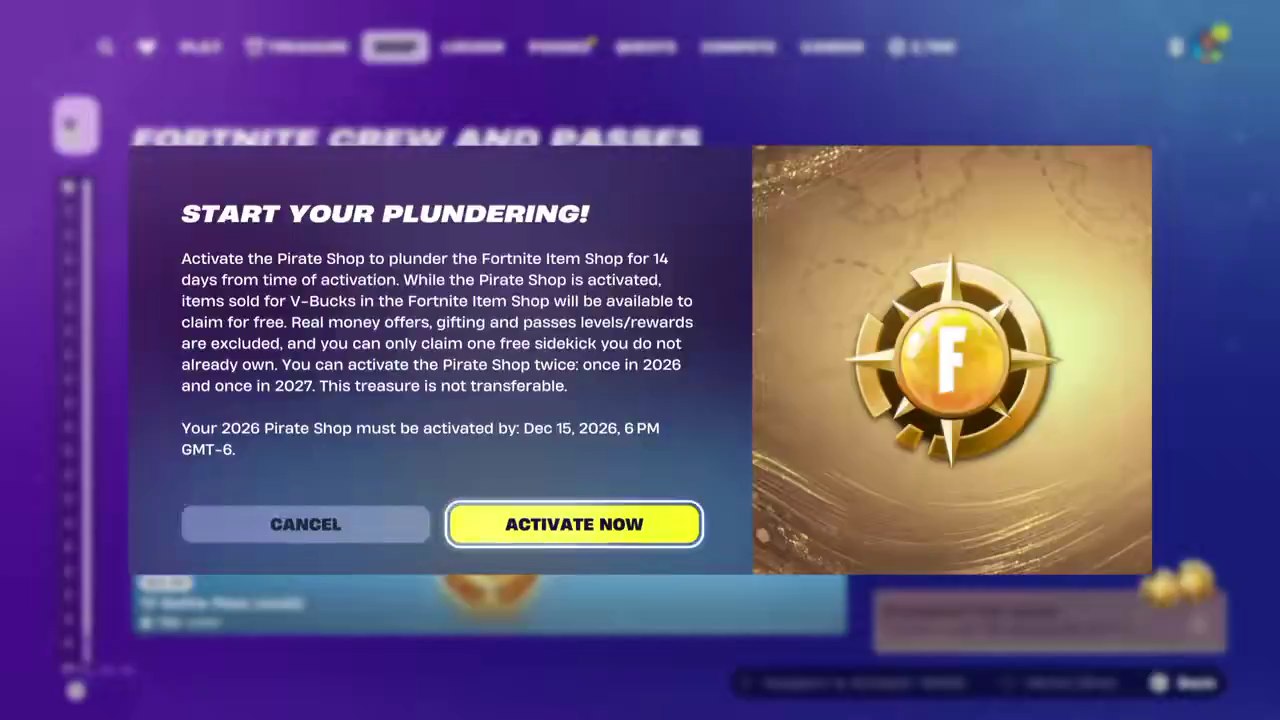
A Pirate Shop Access drop unlocks two separately activated 14-day windows, one for 2026 and one for 2027. Cash offers, gifts and Battle Pass levels or rewards are excluded.
01 / ACTIVATION & EXPIRATION
When do the two tokens expire?
First activation
The reported confirmation screen shows December 15, 2026 at 6 PM UTC−6. That is December 15 at 7 PM US Eastern and December 16 at 00:00 UTC or 8 AM in Shanghai. See the reported in-game screen.
Separate activation
Use the second token during 2027. Published accounts disagree on the exact cutoff. Check the date and time displayed for the 2027 token in your own Item Shop. Reported unlock terms.
Start the clock in Fortnite
- Sign in to the account that received Pirate Shop Access. Open the Item Shop and look for the Pirate Shop Access prompt.
- Check the token year and the cutoff on the confirmation screen. Activate when an eligible offer you want is in rotation or an announced release fits your window.
- Check the end time in Fortnite after activation. Claim the offers you want while both the access window and the offer are active.
02 / OFFER ELIGIBILITY
What can you claim for free?
| Offer | How it works |
|---|---|
| V-Bucks cosmetics | Eligible rotating outfits, emotes and other cosmetics can be claimed at no cost. Check the claim button on the exact offer. |
| Real-money packs | Cash-priced offers are excluded. The token does not provide V-Bucks or cash credit. |
| Gifting and transfers | Claims go to the account that earned access. Gifting to another account and transferring the token are excluded. |
| Sidekicks | The reported terms allow one new Sidekick you do not already own. Choose carefully and check your in-game terms. |
| Pass content | Battle Pass levels and pass rewards are excluded. Check whether a character is a Shop offer or a reward on a separate pass. |
Reported in-game terms say cosmetics claimed during access stay in your Locker after the window closes. Read the reported terms.
FIELD INSTRUMENT / 03
14-day activation planner
Use your device’s local time. Copy the activation cutoff shown in your Fortnite Item Shop if it includes a time. Convert it first if the game shows a different time zone.
Estimated claim window
The cutoff controls when you can start. Your claim window is estimated as 14 × 24 hours from activation. Follow the times shown in Fortnite.
Use the planner to compare a start date with your client’s cutoff. For help deciding when to start, use the 14-day wishlist guide.
Captain’s references
Sources & notes
- FortniteTools · Reported in-game unlock notice
- Fortnite Item Shop Token · Published activation screen and cutoff
- VGC · Pirate Shop Access and activation coverage
- Fortnite · Item Shop
Reviewed by Loot Compass.